
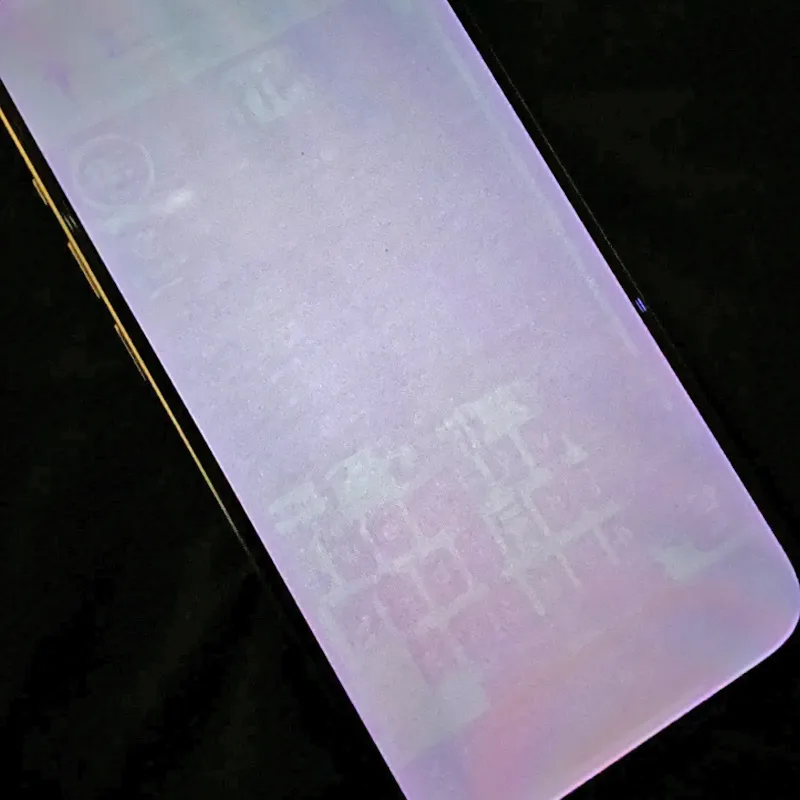
If you notice a faint ghost outline of a static keyboard, navigation bar, or app icon lingering on your display, your first question is likely: Will screen burn-in disappear on its own? The answer depends entirely on your display technology (LCD vs. OLED) and whether the artifact is Temporary Image Retention (TIR) or permanent sub-pixel burn-in. Here is the technical breakdown of recovery timelines, physical mechanisms, and actionable repair steps.
At a Glance: Recovery Timelines by Screen Type
| Display Type | Issue Category | Will It Disappear Naturally? | Passive Recovery Time | Active Recovery Method |
|---|---|---|---|---|
| LCD / IPS | Temporary Image Retention | ✅ Yes (100% reversible) | 15 mins – 2 hours (screen off) | 15–30 mins dynamic color cycling |
| OLED / AMOLED | Short-Term Retention (TIR) | ✅ Yes (100% reversible) | 1 – 4 hours (screen off) | 30–60 mins chromatic cycle at /launch/ |
| OLED / AMOLED | Automated Compensation | ✅ Yes (algorithmic leveling) | Runs automatically in standby | Short cycle (10 min) / Deep cycle (1 hr) |
| OLED / AMOLED | Permanent Hardware Burn-In | ❌ No (irreversible wear) | Will not heal spontaneously | Sub-pixel wear equalization or panel replacement |
Delineating Reversible Retention (TIR) vs. Irreversible Burn-In
1. LCD / IPS Displays: Capacitive Charge Trapping
Liquid crystal displays (LCDs) do not emit light on a per-pixel basis; they use a continuous LED or Mini-LED backlight that shines through liquid crystal alignment layers. Because liquid crystals contain no self-consuming organic light emitters, LCD panels are physically incapable of suffering permanent organic burn-in.
When ghosting appears on an LCD, it is caused by capacitive charge trapping across the polyimide alignment layer after displaying high-contrast static content for consecutive hours. When the driving voltage ceases or alternates, the trapped parasitic charge dissipates, allowing the liquid crystal molecules to relax back into their resting state. The ghost image fades completely within minutes to hours.
2. OLED Displays: Short-Term Retention vs. Permanent Degradation
OLED, QD-OLED, and AMOLED panels utilize millions of individual organic diodes that emit light when electrical current passes through them. On OLED screens, visual artifacts fall into two distinct categories:
- Temporary Image Retention (TIR): Resulting from localized thermal buildup (pixels displaying white UI run warmer than dark surrounding pixels) and transient threshold voltage shifts across the thin-film transistor (TFT) backplane. Once the screen rests or exercises dynamic content, temperatures normalize and backplane charges balance out. TIR disappears on its own within a few hours.
- Permanent Sub-Pixel Burn-In: Caused by cumulative photochemical and electrochemical degradation of organic emissive compounds—predominantly high-energy blue sub-pixels. Under continuous high voltage, organic molecules break down, resulting in an irreversible loss of peak luminous efficiency. Degraded organic molecules cannot spontaneously restore themselves; therefore, true OLED burn-in will never disappear on its own.
Recovery Timelines & What to Expect
Understanding the standard recovery phases helps you determine whether your screen artifact will resolve naturally:
- Passive Rest Phase (15–60 Minutes): Powering off the display lets accumulated thermal heat dissipate. Mild thermal retention on modern OLED panels frequently clears during this initial cooling window.
- Active Software Cycle Phase (30–60 Minutes): Launching our browser repair tool at fixburnin.com/launch/ cycles sub-pixels through rapid RGB and complementary color patterns, accelerating charge dispersal far faster than passive resting.
- OEM Standby Compensation Phase (4–12 Hours): Most modern OLED TVs, monitors, and smartphones run automated compensation routines during standby. These algorithms measure sub-pixel resistance and adjust voltage offsets to restore visual uniformity across the panel.
- Permanent Assessment (After 48 Hours): If a distinct watermark remains visible on a solid 50% gray background after cooling, color cycling, and standby refresh routines, the artifact is permanent sub-pixel degradation.
How to Accelerate Recovery Using the Browser Fix Tool
Rather than waiting hours for passive charge dissipation, you can actively clear temporary image retention using our free Online Screen Burn-In Fix Tool directly in your browser.
Step-by-Step Usage Instructions
- Navigate to fixburnin.com/launch/ on your phone, laptop, monitor, or TV browser.
- Adjust screen brightness to approximately 80%–90%.
- Enter full-screen mode to ensure browser tabs, URL bars, and status bars are completely hidden.
- Select the dynamic chromatic flasher and allow it to run uninterrupted for 30 to 60 minutes.
- Exit full screen and inspect your display against a solid neutral 50% gray background. If the ghost image has disappeared, your panel was experiencing temporary retention.
Summary & Prevention Advice
To conclude: on LCD screens, image retention always clears on its own. On OLED displays, temporary retention vanishes within hours, but permanent organic burn-in will not heal without sub-pixel wear equalization or hardware panel replacement. To protect your display from future issues, enable dark mode, keep screen sleep timeouts under 2 minutes, enable auto-brightness, and run the browser repair tool at /launch/ at the first sign of ghosting.