
Many of us have likely experienced this frustrating issue: after a few years of using a phone, laptop, or monitor, the screen's colors start to look off — either tinged red or pink, or appearing yellowish and dim. This isn't your imagination; the display panel is indeed undergoing physical and optical changes. Below, we explore the engineering principles behind color shifts in different screen technologies (OLED vs. LCD) and how to diagnose and address them.
OLED Screens Turning Red or Pink
The Relationship Between Screen Color and Sub-Pixel Display Ratio
To understand why OLED screens turn red or pink, we first need to know how self-emissive screens display colors. Each pixel is composed of three sub-pixels: red, green, and blue. Various colors are mixed by controlling the brightness ratio of these three sub-pixels. Normally, when displaying pure white (6500K D65 standard), the relative luminance output of all three sub-pixels remains balanced.
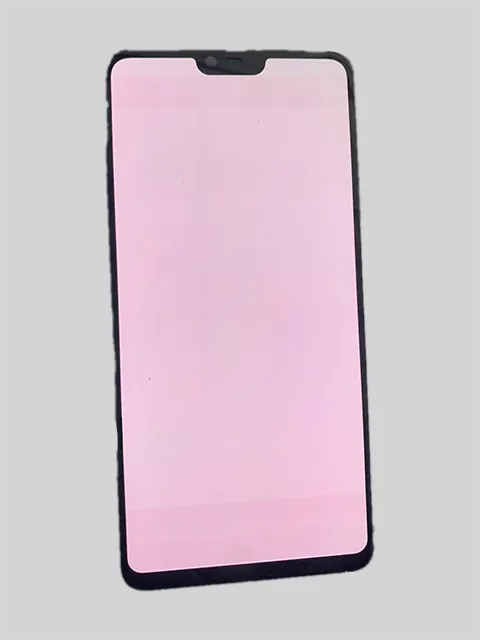
When the screen appears predominantly red, it's typically because the relative brightness of the red sub-pixel remains strong while the green and blue sub-pixels have severely degraded. This shifts the RGB luminance ratio from a balanced 1.0 : 1.0 : 1.0 to something like 1.2 : 0.9 : 0.8. A screen that appears generally pink or magenta indicates a moderate drop in blue and green output relative to red, with a ratio around 1.1 : 0.95 : 0.9. These subtle ratio shifts become increasingly noticeable on white backgrounds after prolonged use.
| Visual Screen Tint | Approximate Effective RGB Ratio (R : G : B) | Primary Sub-Pixel Status |
|---|---|---|
| Pure Neutral White | 1.00 : 1.00 : 1.00 | Balanced emission across Red, Green, and Blue emitters |
| Subtle Warm / Pinkish Tint | 1.10 : 0.95 : 0.90 | Early-stage blue sub-pixel luminance attenuation |
| Noticeable Red / Magenta Cast | 1.20 : 0.90 : 0.80 | Significant blue and green organic emitter degradation |
Organic Materials Used in OLED Screens
The core of an OLED (Organic Light-Emitting Diode) screen is its organic electroluminescent material. These carbon-based compounds emit light whenever an electric current passes through them, eliminating the need for a traditional backlight. This self-emissive architecture is why OLED screens achieve infinite contrast and true blacks.
However, the physical nature of organic emitters means they gradually degrade with cumulative electrical and thermal stress. Each hour of light emission consumes molecular stability—much like a burning candle slowly depleting its wax. Because red, green, and blue emitters rely on different chemical structures and host-dopant mechanisms, they age at different rates. This differential aging is the fundamental reason why OLED screens exhibit color shifts and screen burn-in over time.
Why Blue Pixels Degrade Faster
Among the RGB primary colors, blue sub-pixels degrade the fastest. There are two primary physics and materials science reasons for this:
- Higher Photon Energy of Blue Light: According to quantum physics, photon energy is directly proportional to frequency (and inversely proportional to wavelength). Blue light (~450–460 nm) has a much higher frequency and wider energy bandgap (~2.7–3.0 eV) than green or red light. Consequently, blue organic molecules endure much greater excitonic energy stress during light emission, making their chemical bonds more susceptible to cleavage and trap formation.
- Lower Chemical Stability of Blue Organic Materials: In early OLED technology, the lifespan of blue materials was roughly half that of red and green materials (as red and green adopted efficient phosphorescent emitters while blue relied on fluorescent emitters). While modern deuterium-stabilized and tandem OLED panels have significantly improved longevity, blue sub-pixels still remain the first to lose peak luminance.
When blue sub-pixels begin to degrade, the original balanced RGB ratio is disrupted, and the screen gradually shifts towards a mixture of red and green colors, leading to the red or pink tint we observe. This process typically becomes noticeable after 2-3 years of use.
Countermeasures & How to Test Your OLED Panel
Before concluding that your OLED panel has suffered permanent hardware aging, always rule out software color filters first (such as Windows Night Light, macOS Night Shift / True Tone, or Android Eye Comfort Shield). You can quickly verify whether your display has uniform or localized sub-pixel wear by opening our free Online Screen Burn-In & Color Uniformity Test Tool and inspecting full-screen pure white, 50% gray, and solid blue test patterns.
Because physical OLED degradation is an irreversible chemical process, prevention and equalization are key:
- Avoid prolonged display of static images: Especially bright white, cyan, or blue UI elements. Regularly vary screen content or run periodic pixel refresh cycles at Fixburnin.com to help equalize uneven sub-pixel wear.
- Appropriately reduce screen brightness: High brightness exponentially accelerates the thermal and electrical degradation of blue organic materials. Enable adaptive brightness and avoid running maximum manual brightness unless under direct sunlight.
- Sensibly use dark mode: A dark background keeps most pixels in a low-power state—and pure black pixels emit no light at all—dramatically extending the panel's color balance lifespan.
- Calibrate RGB White Balance in Settings: Many smartphones (such as Samsung Galaxy and Xiaomi devices) and desktop monitors allow manual RGB slider calibration under Display → Screen Mode → Advanced Settings. Slightly reducing the Red slider can visually neutralize a mild pink cast.
LCD Screens Turning Yellow
Explanation of Causes
Unlike OLED, the reasons for LCD screens turning yellow are completely different. It's crucial to note that LCD screens turning yellow is not due to burn-in. In fact, IPS and VA LCD screens do not experience permanent sub-pixel burn-in. Burn-in is a phenomenon unique to self-emissive screens like OLEDs. LCDs display images by shining a continuous LED backlight through liquid crystal shutters and color filters, so individual pixels do not "burn out."
The yellowing of LCD screens is primarily caused by the aging of physical optical and backlight components that make up the display stack. This is a gradual thermal and photochemical process.
Aging of Physical Components
The yellowing problem in LCD screens can be attributed to the aging of three main components:
- Liquid Crystal Panel & Polarizer Aging is the most complex issue to address. Liquid crystal molecules undergo orientation stress under long-term electric field exposure, while the polymer polarizing films and PMMA light-guide plates slowly yellow when exposed to heat. This manifests as an overall color temperature shift toward warm yellow.
- Backlight Component Aging is the most common cause of uniform yellowing. Modern LCD backlights use blue InGaN LEDs coated with yellow YAG phosphor to produce white light. Over thousands of hours of high-temperature operation, the phosphor layer and silicone encapsulation degrade and shift the emission spectrum toward yellow-green, accompanied by a noticeable drop in peak brightness.
- Optical Glue (LOCA / OCA) Aging primarily affects the screen edges and borders. Optical clear adhesive is a transparent bonding material used to laminate the display panel and touch glass. Under high temperatures, battery heat, or UV light exposure, the adhesive undergoes thermal oxidation, gradually turning from water-clear to amber yellow. This aging typically starts along the four edges of a phone or tablet screen and spreads inward, forming noticeable yellow borders or patches.
Generally, the backlight component and edge optical adhesive are the first to show aging because they endure continuous thermal accumulation.
Impact of Screen Yellowing
Yellowing is usually accompanied by decreased brightness, making outdoor readability poorer. Users often increase brightness to 100% to compensate, which in turn generates more heat and accelerates the aging of the adhesive and backlight, creating a vicious cycle. Non-uniform yellowing (such as yellow edges next to a cooler center) also causes visual fatigue and eye strain during prolonged reading.
Furthermore, color accuracy decreases significantly. With white no longer appearing neutral, photo editing, design work, and video playback suffer from an inaccurate warm cast.
Countermeasures
While hardware yellowing on LCDs cannot be completely reversed by software, you can mitigate mild tint shifts by adjusting your device's color temperature toward "Cool" (increasing blue gain) in display settings. For hardware repairs:
- Backlight Module Replacement: If uniform yellowing and dimming are caused by LED backlight aging on a desktop monitor or TV, replacing the LED backlight strips is an economical and effective repair.
- Optical Glue Re-lamination: Yellow edges caused by oxidized OCA glue require separating the glass in a dust-free facility and re-applying fresh optical adhesive—often making full screen assembly replacement more cost-effective on older phones.
- Thermal Management: Avoid leaving phones or laptops in hot cars, direct sunlight, or under pillows while fast-charging, as excess heat is the #1 catalyst for both LCD adhesive yellowing and OLED pink tinting.
In summary, whether it's the red/pink shift of OLEDs caused by blue sub-pixel degradation or the yellowing of LCDs caused by backlight and adhesive oxidation, understanding the underlying display physics helps you diagnose your screen accurately. To inspect your display's RGB channels and uniformity right now, launch our free Screen Burn-In & Color Diagnostic Tool.